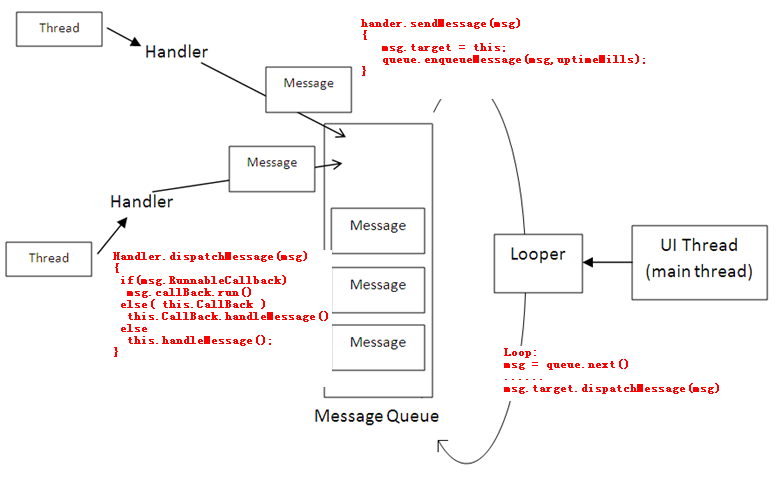
Android应用的主线程(UI线程)用作更新UI,不可以让主线程做费时操作,否则会出现ANR(App Not Response),一般处理耗时操作时都需要开启一个线程,线程执行结束,发送消息给主线程来更新UI
常用的方法有:
Activity.runOnUiThread(Runnable)
View.post(Runnable)
View.postDelayed(Runnable,long)
Handler机制
runOnUiThread runOnUiThread是Activity的内置方法,它先判断当前线程是不是主线程,如果是则执行,不是则使用Handler机制post到消息队列
1
2
3
4
5
6
7
public final void runOnUiThread (Runnable action) { if (Thread.currentThread() != mUiThread) { mHandler.post(action); } else { action.run(); } }
View.post View.post本质上同样是使用Hander来传递Runnable对象
1
2
3
4
5
6
7
8
9
10
public boolean post (Runnable action) { final AttachInfo attachInfo = mAttachInfo; if (attchInfo != null ) { return attachInfo.mHandler.post(action); } ViewRootImpl.getRunQueue().post(action); return true ; }
View.postDelayed同样是使用Handler
Handler Android使用的消息机制为Handler-Looper,实现线程的通信,线程通过Looper建立自己的消息循环,MessageQueue是FIFO的消息对列,Looper负责从MessageQueue中取出消息,并且分发到消息指定目标Handler对象,Handler对象绑定到线程的局部变量Looper,封装了发送消息和处理消息的接口。Handler类构造方法
1
2
3
4
5
6
7
8
9
10
11
12
13
14
15
16
17
18
19
20
21
22
23
24
25
26
27
public Handler (Callback callback,boolean async) { ... mLooper = Looper.myLooper(); if (mLooper == null ){ throw new RuntimeException ( "Can't create handler inside thread that has not called Looper.prepare()" ); } mQueue = mLooper.mQueue; mCallback = callback; mAsynchronnous = async; } public static Looper myLooper () { return sThreadLocal.get() } private static void prepare (boolean quitAllowed) { if (sThreadLocal.get() != null ){ throw new RuntimeException ("Only one Looper may be created per thread" ); } sThreadLocal.set(new Looper (quitAllowed)); } ...
Handler的构造方法通过当前线程唯一的Looper对象来初始化消息队列(共享的Looper的mQueue)
初始化 Android应用程序在启动时,会在进程中加载ActivityThread类,并且执行这个类的main函数
1
2
3
4
5
6
7
8
9
10
11
public final class ActivityThread { ... public static final void main (String[] args) { ... Looper.preparMainLooper(); ... Looper.loop(); ... } }
消息的发送和接收 创建一个Message对象使用setData()方法或arg参数等方式携带一些数据,借助Handler将消息发送出去,主线程创建Handler对象时实现其handleMessage方法即可
1
2
3
4
5
6
7
8
9
10
11
12
13
14
15
16
17
18
new Thread (new Runnable () { @Override public void run { Message message = new Message (); message.arg1 = 1 ; Bundle bundle = new Bundle (); bundle.putString("data" ,"data" ); message.setData(bundle); handler.sendMessage(message); } }).start(); Handler handler = new Handler (){ @Override public void handleMessgae (Message msg) { ...... } }
在Handler中提供了很多发送消息的方法,其中除了sendMessageAtFrontOfQueue()方法外,其他方法都会调用sendMessageAtTime()方法,源码如下
1
2
3
4
5
6
7
8
9
10
11
12
13
14
15
16
17
public boolean sendMessageAtTime (Messgae msg,long uptimeMillis) { MessageQueue queue = mQueue; if (queue == null ) { RuntimeException e = new RuntimeException ( this + " sendMessageAtTime() called with no mQueue" ); Log.w("Looper" ,e.getMessage(),e); return false ; } return enqueueMessage(queue,msg,uptimeMillis); } private boolean enqueueMessage (MessageQueue queue,Message msg,long uptimeMillis) { msg.target = this ; if (mAsynchronous){ msg.setAsynchronous(true ); } return queue.enqueueMessage(msg,uptimeMillis); }
由于MessageQueue是在Looper中创建,线程中只有一个MessageQueue
1
2
3
4
5
6
7
8
9
10
11
12
13
14
15
16
17
18
19
20
21
22
23
24
25
26
27
28
29
30
31
32
33
34
35
36
37
38
39
40
41
42
43
44
45
boolean enqueueMessage (Message msg,long when ) { if (msg.isInUse()) { throw new AndroidRuntimeException (msg + " This message is already in use." ); } if (msg.target == null ) { throw new AndroidRuntimeException ("Message must have a target." ); } synchronized (this ) { if (mQuitting) { RuntimeException e = new RuntimeException ( msg.target + " sending message to a Handler on a dead thread" );) Log.w("MessageQueu" ,e.getMessage(),e); return false ; } msg.when = when ; Message p = mMessages; boolean needWake; if (p == null || when == 0 || when < p.when ) { msg.next = p; mMessages = msg; needWake = mBlocked; } else { needWake = mBlocked && p.target == null && msg.isAsynchronous(); Message = prev; for (;;) { prev = p; p = p.next; if (p == null || when < p.when ) { break ; } if (needWake && p.isAsunchronous()) { needWake = false ; } } msg.next = p; prev.next = msg; } if (needWake) { nativeWake(mPtr); } } return true ; }
MessageQueue使用mMessage对象表示当前待处理的消息,msg入队时,如果当前MessgaeQueue中的mMessage对象不为空,说明有某个message正在入队,此时在for循环中等待,一直等到mMessage为空
如果使用sendMessageAtFrontOfQueue()方法来发送消息,它也会调用enqueueMessage()来让消息入队,只不过时间为0,这时会把mMessages赋值为新入队的这条消息,然后将这条消息的next指定为刚才的mMessage
1
2
3
4
5
6
7
8
9
10
11
12
13
14
15
16
17
18
19
20
21
22
23
24
25
26
27
28
29
30
31
32
33
34
35
36
37
38
39
40
41
42
43
44
45
46
47
48
49
public static void loop () { final Looper me = myLooper(); if (me == null ) { throw new RuntimeException ("No Looper; Looper.prepare() wasn't called on this thread." ); } final MessageQueue queue = me.queue; Binder.clearCallingIdentity(); final long ident = Binder.clearCallingIdentity(); for (;;){ Message msg = queue.next(); if (msg == null ) { return ; } } Printer logging = me.mLogging; if (logging != null ) { logging.println(">>>>> Dispatching to " + msg.target + " " + msg.callback + ": " + msg.what); } msg.target.dispatchMessage(msg); if (logging != null ) { logging.println("<<<<< Finished to " + msg.target + " " + msg.callback); } final long newIdent = Binder.clearCallingIdentity(); if (ident != newIdent) { Log.wtf(TAG, "Thread identity changed from 0x" + Long.toHexString(ident) + " to 0x" + Long.toHexString(newIdent) + " while dispatching to " + msg.target.getClass().getName() + " " + msg.callback + " what=" + msg.what); } msg.recycle(); } } public void dispatchMessage (Message msg) { if (msg.callback != null ) { handleCallback(msg); } else { if (mCallback != null ) { if (mCallback.handleMessage(msg)) { return ; } } handleMessage(msg); } }
标准的异步消息处理的写法应该是:
1
2
3
4
5
6
7
8
9
10
11
12
13
14
class LooperThread extends Thread { public Handler mHandler; public void run () { Looper.prepare(); mHandler = new Handler () { public void handleMessage (Message msg) { } }; Looper.loop(); } }