测光与聚焦区域

如果设备支持自动对焦,可以使用setFocusMode方法传入一个Camera.Parameters.FOCUS_MODE_*常量来指定对焦模式。根据不同设备的支持,使用getSupportedFocusMode方法找到可用的对焦模式。使用自动对焦可以使用AutoFocusCallback回调。

1
2
3
4
5
6
7
8
9
10
Camera.Parameters parameters = camera.getParameters();
if(parameters.getSupportedFocusModes().contains(Camera.Parameters.FOCUS_MODE_CONTINUOUS_PICTURE)){
parameters.setFocusMode(Camera.Parameters.FOCUS_MODE_CONTINUOUS_PICTURE);

camer.autoFocus(new AutoFocusCallback(){
public void onAutoFocus(boolean success,Camera camera){
//
}
});
}

getMaxNumFocusAreas方法来确定涉笔是否支持定义对焦区域。getMaxNumMeteringAreas来确定摄像头是否支持测光区域。

1
2
3
4
5
6
7
8
9
10
11
if(params.getMaxNumMeteringAreas() > 0) { // 检查是否支持测光区域
List<Camera.Area> meteringAreas = new ArrayList<Camera.Area>();

Rect areaRect1 = new Rect(-100,-100,100,100); // 在图像的中心指定一个区域
meteringAreas.add(new Camera.Area(areaRect1,600)); // 设置宽度待60%
Rect areaRect2 = new Rect(800,-1000,1000,-800); // 在图像的右上角指定一个区域
meteringAreas.add(new Camera.Area(areaRect2,400)); // 设置宽度为40%
params.setMeteringAreas(meteringAreas);
}

mCamera.setParameters(params);

Camera.Area对象包含两个参数:一个Rect对象指定了相机视图中的一个区域,还有一个宽度,告诉相机在测光或聚焦计算中此区域的重要程度。
Camera.Area对象的Rect描述了一个矩形区域在一个2000*2000个单元格组成的区域中的映射位置。坐标-1000,-1000表示左上角,1000,1000表示右下角。不会随变焦大小改变。

人脸识别

调用getMaxNumDetectedFaces()来检测是否支持面部检测特性

1
2
3
4
5
6
7
8
class MyFaceDetectionoListener implements Camera.FaceDetectionListener {
@Override
public void onFaceDetection(Face[] faces,Camera camera) {
if (faces.length > 0) {
Log.d("FaceDetection","face detected:" + faces.length + "face 1 Location x:" + faces[0].rect.centerX() + "Y:" + faces[0].rect.centerY());
}
}
}

1
2
3
4
5
6
7
8
9
10
11
12
13
14
15
16
17
18
19
20
21
22
23
24
25
26
27
28
29
30
31
32
33
34
35
36
37
38
39
40
41
42
43
44
45
46
47
48
49
50
51
52
53
54
55
56
57
58
59
60
61
62
63
class Preview extends ViewGroup implements SurfaceHolder.Callback {
SurfaceView mSurfaceView;
SurfaceHolder mHolder;

Perview(Context context){
super(context);

mSurfaceView = new SurfaceView(context);
addView(mSurfaceView);
mHolder = mSurfaceView.getHolder();
mHolder.addCallback(this);
mHolder.setType(SurfaceHolder.SURFACE_TYPE_PUSH_BUFFERS);
}

}

public void setCamera(Camera camera) {
if (mCamera == camera) { return; }

stopPreviewAndFreeCamera();

mCamera = camera;

if (mCamera != null) {
List<Size> localSizes = mCamera.getParameters().getSupportedPreviewSizes();
mSupportedPreviewSizes = localSizes;
requestLayout();

try {
mCamera.setPreviewDisplay(mHolder);
} catch (IOException e) {
e.printStackTrace();
}
mCamera.startPreview();
}
}
// 修改相机设置
public void surfaceChanged(SurfaceHolder holder,int format,int w,int h) {
Camera.Parameters parameters = mCamera.getParameters();
parameters.setPreviewSize(mPreviewSize.with,mPreviewSize.height);
requestLayout();
mCamera.setParameters(parameters);
mCamera.startPreview();
}
// 设置预览方向 setCameraDisplayOrientation()方法 Android Api level 14之前 必须先体质预览

// 拍摄照片
Camera.takePicture()拍下图片
创建Camera.PictureCallback与Camera.ShutterCallback 对象并传递到Camera.takePocture()中
如果想做连拍动作,可以创建一个Camera.PreviewCallback并实现onPerviewFrame()
// 停止预览并释放相机
public void surfaceDestroyed(SurfaceHolder holder) {
if (mCamera != null) {
mCamera.stopPreview();
}
}
public void stopPreviewAndFreeCamera() {
if (mCamera != null) {
mCamera.stopPreview();
mCamera.release();
mCamera = null;
}
}

  • ccp(x,y) 创建一个向量

  • ccpFromSize(s) 以size s的width为x,height为y创建一个向量

  • ccpAdd(v1,v2) 向量之间的加法

  • ccpSub(v1,v2) 向量之间的减法

  • ccpNeg(v) 向量取反

  • ccpMult(v,s) 数乘,等价于ccp(v.xs,v.ys) s是一个浮点数

  • ccpMidpoint(v1,v2) 取中点

  • ccpDot(v1,v2) 点乘 等价于 v1.xv2.x + v1.yv2.y

  • ccpCross(v1,v2) 叉乘 等价于 v1.xv2.y - v1.yv2.x

  • ccpProject(v1,v2) 返回向量v1在向量v2的投影向量

  • ccpLength(v) 返回向量v的长度

  • ccpLengthSQ(v) 返回向量v的长度的平方

  • ccpDistance(v1,v2) 返回点v1到v2的距离

  • cppDistanceSQ(v1,v2) 返回点v1到v2距离的平方

  • ccpNormalize(v) 返回v的标准化向量,就是长度为1

  • ccpRotate(v1,v2) 向量v1旋转过向量v2的角度并且乘上向量v2的长度。当v2是一个长度为1的标准向量时就是正常的旋转了,可以配套地用ccpForAngle

  • ccpPerp(v) 等价于 ccp(-v.y, v.x); (因为opengl坐标系是左下角为原点,所以向量v是逆时针旋转90度)

  • ccpRPerp(v) 等价于 ccp(v.y, -v.x); 顺时针旋转90度

  • ccpForAngle(a) 返回一个角度为弧度a的标准向量

  • ccpToAngle(v) 返回向量v的弧度

  • ccpAngle(a, b) 返回a,b向量指示角度的差的弧度值

  • ccpRotateByAngle(v, pivot, angle) 返回向量v以pivot为旋转轴点,按逆时针方向旋转angle弧度

  • CC_RADIANS_TO_DEGREES(a) 弧度转角度

  • CC_DEGREES_TO_RADIANS(a) 角度转弧度

  • CCRANDOM_MINUS1_1() 产生-1到1之间的随机浮点数

  • CCRANDOM_0_1() 产生0到1之间的随机浮点数

  • CCAssert(cond,msg) 断言表达式cond为真,如果不为真,则显示字符串msg信息

1
2
3
4
5
6
7
8
9
10
11
12
13
14
15
16
17
CCArray* _array;  
CCObject* _object; // 用来遍历数组的临时变量
CCARRAY_FOREACH(_array, _object) // 正向遍历
{
// todo with _object....
}

CCARRAY_FOREACH_REVERSE(_array, _object) // 反向遍历
{
// todo with _object....
}
CCDictionary* _dict;
CCDictElement* _elmt; // 遍历表的临时变量
CCDICT_FOREACH(_dict, _elmt)
{
  // todo with elmt;
}
  • CREATE_FUNC() 创建构造函数
1
2
3
4
5
6
7
8
9
10
11
12
13
14
15
16
# define CREATE_FUNC(__TYPE__)
static __TYPE__* create()
{
__TYPE__ *pRet = new __TYPE__();
if (pRet && pRet->init())
{
pRet->autorelease();
return pRet;
}
else
{
delete pRet;
pRet = NULL;
return NULL;
}
}

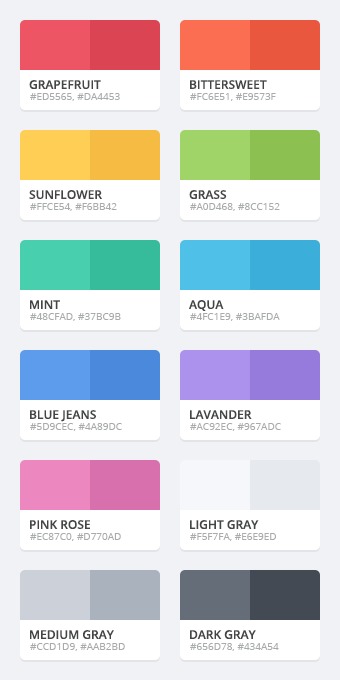
  • GRAPEFRUIT # ED5565,# DA4453
  • BITTERSWEET # FC6E51,# E9573F
  • SUNFLOWER # FFCE54,# F6BB42
  • GRASS # A0D468,# 8CC152
  • MINT # 48CFAD,# 37BC9B
  • AQUA # 4FC1E9,# 3BAFDA
  • BLUE JEANS # 5D9CEC,# 4A89DC
  • LAVANDER # AC92EC,# 967ADC
  • PINK ROSE # EC87C0,# D770AD
  • LIGHT GRAY # F5F7FA,# E6E9ED
  • MEDIUM GRAY # CCD1D9,# AAB2BD
  • DARK GRAY # 656D78,# 434A54

不透明度16进制值

不透明度 16进制值
100% FF
95% F2
90% E6
85% D9
80% CC
75% BF
70% B3
65% A6
60% 99
55% 8C
50% 80
45% 73
40% 66
35% 59
30% 4D
25% 40
20% 33
15% 26
10% 1A
5% 0D
0% 00

  • listview的item可选的背景
1
2
3
4
5
6
7
8
9
10
11
12
13
14
<?xml version="1.0" encoding="utf-8" ?>
<selector xmlns:android="http://schemas.android.com/apk/res/android">
<!-- 默认时的背景背景 -->
<item android:drawable="@drawable/pic1" />
<!-- 没有焦点时的背景图片 -->
<item android:state_window_focused="false" android:drawable="@drawable/pic1" />
<!-- 非触摸模式下获得焦点并单击时的背景图片 -->
<item android:state_focused="true" android:state_pressed="true" android:drawable="@drawable/pic2" />
<!-- 触摸模式下单击时的背景图片 -->
<item android:state_focused="false" android:state_pressed="true" android:drawable="@drawable/pic3" />
<!-- 选中时的图片背景 -->
<item android:state_selected="true" android:drawable="@drawable/pic4" />
<!-- 获得焦点时的图片背景 -->
<item android:state_focused="true" android:drawable="@drawable/pic5" />

在listView中配置android:listSelector="@drawable/list_item_bg"或者在item中添加android:background="@drawable/list_item_bg"即可实现,或者在java代码中使用Drawable drawable = getResources().getDrawable(R.drawable.list_item_bg);,listView.setSelector(drawable);。可能出现列表出现黑的情况,加上android:cacheColorHint="@android:color/transparent"

  • button的可选背景
    • android:state_selected 为选中
    • android:state_focused 获得焦点
    • android:state_pressed 点击
    • android:state_enable 是否响应事件,指所有事件
1
2
3
4
5
6
7
<?xml version="1.0" encoding="utf-8"?>
<selector xmlns:android="http://schemas.android.com/apk/res/android">
<item android:state_selected="true" android:color="# FFF" />
<item android:state_focused="true" android:color="FFF" />
<item android:state_pressed="true" android:color="# FFF" />
<item android:color="# 000" />
</selector>

1
2
3
4
5
6
7
8
9
10
11
12
13
14
15
16
17
18
19
20
21
22
23
24
25
26
27
28
29
30
31
32
33
34
35
36
37
38
39
40
41
42
43
44
45
46
47
48
49
50
51
52
53
54
55
56
public class PixelUtils {
private static Context mContext = MyApplication.getInstance();

// dp->px
public static int dp2px(float value) {
final float scale = mContext.getResources().getDisplayMetrics().densityDpi;
return (int) (value * (scale / 160) + 0.5f);
}
// dp->px
public static int dp2px(float value, Context context) {
final float scale = context.getResources().getDisplayMetrics().densityDpi;
return (int) (value * (scale / 160) + 0.5f);
}
// px->dp
public static int px2dp(float value) {
final float scale = mContext.getResources().getDisplayMetrics().densityDpi;
return (int) ((value * 160) / scale + 0.5f);
}
// px->dp
public static int px2dp(float value, Context context) {
final float scale = context.getResources().getDisplayMetrics().densityDpi;
return (int) ((value * 160) / scale + 0.5f);
}
// sp->px
public static int sp2px(float value) {
Resources r;
if (mContext == null) {
r = Resources.getSystem();
} else {
r = mContext.getResources();
}
float spvalue = value * r.getDisplayMetrics().scaledDensity;
return (int) (spvalue + 0.5f);
}
// sp->px
public static int sp2px(float value, Context context) {
Resources r;
if (context == null) {
r = Resources.getSystem();
} else {
r = context.getResources();
}
float spvalue = value * r.getDisplayMetrics().scaledDensity;
return (int) (spvalue + 0.5f);
}
// px->sp
public static int px2sp(float value) {
final float scale = mContext.getResources().getDisplayMetrics().scaledDensity;
return (int) (value / scale + 0.5f);
}
// px->sp
public static int px2sp(float value, Context context) {
final float scale = context.getResources().getDisplayMetrics().scaledDensity;
return (int) (value / scale + 0.5f);
}
}

1
2
3
4
5
6
7
8
9
10
11
12
13
14
15
16
17
18
19
20
21
22
23
24
25
26
27
28
29
30
31
32
33
34
35
36
37
38
39
40
41
42
43
44
45
46
47
48
49
50
51
52
53
54
55
56
57
58
59
60
61
62
63
64
65
66
67
68
69
70
71
72
73
74
75
76
77
78
79
80
81
82
83
84
85
86
87
88
89
90
public class PerferencesUtils {
public static String PREFERENCE_NAME = "MYPERFERENCERS";

public static boolean putString(Context context,String key,String value) {
SharedPreferces settings = context.getSharedPreferences(PREFERENCE_NAME,Context.MODE_PRIVATE);
SharedPreferces.Editor = settings.edit();
editor.putString(key,value);
return editor.commit();
}

public static String getString(Context context,String key) {
return getString(context,key,null);
}

public static String getString(Context context,String key,String defaultValue) {
SharedPreferces settings = context.getSharedPreferences(PREFERENCE_NAME,Context.MODE_PRIVATE);
return settings.getString(key,defaultValue);
}

public static boolean putInt(Context context,String key,int value) {
SharedPreferces settings = context.getSharedPreferences(PREFERENCE_NAME,Context.MODE_PRIVATE);
SharedPreferces.Editor = settings.edit();
editor.putInt(key,value);
return editor.commit();
}

public static int getInt(Context context,String key) {
return getInt(context,key,-1);
}

public static int getInt(Context context,String key,int defaultValue) {
SharedPreferences settings = context.getSharedPreferences(PREFERENCE_NAME,Context.MODE_PRIVATE);
return settings.getInt(key,defaultValue);
}

public static putLong(Context context,String key,long value) {
SharedPreferences settings = context.getSharedPreferences(PREFERENCE_NAME,Context.MODE_PRIVATE);
SharedPreferences.Editor editor = settings.edit();
editor.putLong(key,value);
return editor.commit();
}

public static long getLong(Context context, String key) {
return getLong(context, key, -1);
}

public static long getLong(Context context, String key, long defaultValue) {
SharedPreferences settings = context.getSharedPreferences(
PREFERENCE_NAME, Context.MODE_PRIVATE);
return settings.getLong(key, defaultValue);
}

public static boolean putFloat(Context context, String key, float value) {
SharedPreferences settings = context.getSharedPreferences(
PREFERENCE_NAME, Context.MODE_PRIVATE);
SharedPreferences.Editor editor = settings.edit();
editor.putFloat(key, value);
return editor.commit();
}

public static float getFloat(Context context, String key) {
return getFloat(context, key, -1);
}

public static float getFloat(Context context, String key, float defaultValue) {
SharedPreferences settings = context.getSharedPreferences(
PREFERENCE_NAME, Context.MODE_PRIVATE);
return settings.getFloat(key, defaultValue);
}

public static boolean putBoolean(Context context, String key, boolean value) {
SharedPreferences settings = context.getSharedPreferences(
PREFERENCE_NAME, Context.MODE_PRIVATE);
SharedPreferences.Editor editor = settings.edit();
editor.putBoolean(key, value);
return editor.commit();
}

public static boolean getBoolean(Context context, String key) {
return getBoolean(context, key, false);
}

public static boolean getBoolean(Context context, String key,
boolean defaultValue) {
SharedPreferences settings = context.getSharedPreferences(
PREFERENCE_NAME, Context.MODE_PRIVATE);
return settings.getBoolean(key, defaultValue);
}

}

1
2
3
4
5
6
7
8
9
10
11
12
13
14
15
16
17
18
19
20
21
22
23
24
25
26
27
28
29
30
31
32
33
34
35
36
37
38
39
40
41
42
43
44
45
46
47
48
49
50
51
52
53
54
55
56
57
58
59
60
61
62
63
public class RandomUtils {
// 制定字符串范围的因子
public static final String NUMBERS_AND_LETTERS = "0123456789abcdefghijklmnopqrstuvwxyzABCDEFGHIJKLMNOPQRSTUVWXYZ";
public static final String NUMBERS = "0123456789";
public static final String LETTERS = "abcdefghijklmnopqrstuvwxyzABCDEFGHIJKLMNOPQRSTUVWXYZ";
public static final String CAPITAL_LETTERS = "ABCDEFGHIJKLMNOPQRSTUVWXYZ";
public static final String LOWER_CASE_LETTERS = "abcdefghijklmnopqrstuvwxyz";
// 获取随机数字、字母字符串
public static String getRandomNumbersAndLetters(int length) {
return getRandom(NUMBERS_AND_LETTERS, length);
}
// 获取随机数字字符串
public static String getRandomNumbers(int length) {
return getRandom(NUMBERS, length);
}
// 获取英文字母组成的随机字符串
public static String getRandomLetters(int length) {
return getRandom(LETTERS, length);
}
// 获取大写字母组成的随机字符串
public static String getRandomCapitalLetters(int length) {
return getRandom(CAPITAL_LETTERS, length);
}
// 获取小写字母组成的随机字符串
public static String getRandomLowerCaseLetters(int length) {
return getRandom(LOWER_CASE_LETTERS, length);
}
// 获取制定字符串和长度的随机字符串
public static String getRandom(String source, int length) {
return TextUtils.isEmpty(source) ? null : getRandom(
source.toCharArray(), length);
}
// 获取制定字符数组和长度的随机字符串
public static String getRandom(char[] sourceChar, int length) {
if (sourceChar == null || sourceChar.length == 0 || length < 0) {
return null;
}

StringBuilder str = new StringBuilder(length);
Random random = new Random();
for (int i = 0; i < length; i++) {
str.append(sourceChar[random.nextInt(sourceChar.length)]);
}
return str.toString();
}

// 获取0~max范围的随机int
public static int getRandom(int max) {
return getRandom(0, max);
}

// 获取min~max范围的随机int
public static int getRandom(int min, int max) {
if (min > max) {
return 0;
}
if (min == max) {
return min;
}
return min + new Random().nextInt(max - min);
}

}

序列化工具类,用于序列化对象对文件或从文件反序列化对象

1
2
3
4
5
6
7
8
9
10
11
12
13
14
15
16
17
18
19
20
21
22
23
24
25
26
27
28
29
30
31
32
33
34
35
36
37
38
39
40
41
42
43
44
45
46
public class Serialization(String filePath) {
public static Object deserialization(String filePath){
ObjectInputStream in = null;
try {
in = new ObjectInputStream(new FileInputStream(filePath));
Object o = in.readOject();
in.close();
return o;
} catch (FileNotFoundException e) {
throw new RuntimeException("FileNotFoundException occurred. ", e);
} catch (ClassNotFoundException e) {
throw new RuntimeException("ClassNotFoundException occurred. ", e);
} catch (IOException e) {
throw new RuntimeException("IOException occurred. ", e);
} finally {
if (in != null) {
try {
in.close();
} catch (IOException e) {
throw new RuntimeException("IOException occurred. ", e);
}
}
}
}

public static void serialization(String filePath,Object obj) {
ObjectOutputStream out = null;
try {
out = new ObjectOutputStream(new fileOutputStream(filePath));
out.writeObject(obj);
out.close();
} catch (FileNotFoundException e) {
throw new RuntimeException("FileNotFoundException occurred. ", e);
} catch (IOException e) {
throw new RuntimeException("IOException occurred. ", e);
} finally {
if (out != null) {
try {
out.close();
} catch (IOException e) {
throw new RuntimeException("IOException occurred. ", e);
}
}
}
}
}