POP动画极为流畅,秘密就在于POP通过CADisplayLink高达60FPS的特性,打造了一个游戏级的动画引擎。
CADisplayLink是一个类似NSTimer的定时器,不同之处在于,NSTimer用于定义任务的执行周期,它的执行收到了CPU阻塞影响,而CADisplayLink则用于定义画面的重绘,动画的演变,基于帧(frames)的间隔。通过CADisplayLink程序的重绘速度设定到和屏幕刷新频率一致,因此可以得到流畅的交互动画。

基本类型

Spring Animation

Spring Animation提供了一个弹簧效果的动画,通过一系列参数的设置,完成风骚的动画

  • Bounciness 反弹,影响动画作用的参数的变化幅度
  • Speed 速度
  • Tension 拉力,影响回弹力度以及速度
  • Friction 摩擦力,如果开启,动画会不断重复,幅度逐渐削弱,知道停止
  • Mass 质量,细微的影响动画的回弹力度以及速度
1
2
3
4
5
6
7
8
9
10
// 创建一个二维平面沿X轴和Y轴进行缩放的动画
POPSpringAnimation *anim = [POPSpringAnimation animationWithPropertyNamed:kPOPLayerScaleXY];
// 指定缩放倍数,不指定fromValue,POP会默认使用当前大小
anim.toValue = [NSValue valueWithCGPoint:CGPointMake(2.0,2.0)];
anim.springBounciness = 4.0;
anim.springSpeed = 12.0;
// 指定Callback,在动画执行的过程中,会不断调用该block
anim.completionBlock = ^(POPAnimation *anim,BOOL finished){
if(finished) {NSLog(@"animation finished!");}
};

Decay Animation

Decay Animation变现为一个衰减效果的动画,设置一个参数velocity(速率)

1
2
3
4
5
6
POPDecayAnimation *anim = [POPDecayAnimation animWithPropertyNamed:kPOPLayerPositionX];
anim.velocity = @(100.0);
anim.fromValue = @(25.0);
anim.completionBlock = ^(POPAnimation *anim,BOOL finished){
if(finished){NSLog(@"Stop");}
};

设置deceleration(负向速度)可以设置一个加速度量

Property Animation & Basic Animation

Property Animation为属性动画,是Spring Animation和Decay Animation的父类

1
2
3
4
5
6
7
8
9
10
11
12
13
14
15
16
17
18
19
POPBasicAnimation *anim = [POPBasicAnimation animation];
anim.duration = 10.0;
// 一个慢开慢停的动画
anim.timingFunction = [CAMediaTimingFunction functionWithName:kCAMediaTimingFunctionEaseInEaseOut];
// 定义属性
POPAnimatableProperty * prop = [POPAnimatableProperty
propertyWithName:@"count"
initializer:^(POPMutableAnimatableProperty *prop)
{ prop.readBlock = ^{id obj,CFFloat values[])
// 告诉POP如何获取值
{ value[0] = [[obj description] floatValue];};
prop.writeBlock = ^(id obj,const CFFloat values[])
// 如何改变值
{ [obj setText:[NSString stringWithFormat:@"%.2f",values[0]]];};
// 设置动画变化阀值
prop.threshold = 0.01;}];
anim.property = prop;
anim.fromValue = @(0.0);
anim.toValue = @(100.0);

Android应用的主线程(UI线程)用作更新UI,不可以让主线程做费时操作,否则会出现ANR(App Not Response),一般处理耗时操作时都需要开启一个线程,线程执行结束,发送消息给主线程来更新UI

Read More

使用JSONModel

  1. 创建一个新的Ocjective-C的类并继承JSONModel
  2. 在头文件中声明Json中Keys同名属性
1
2
3
4
5
6
7
8
9
10
@import "JSONModel.h"

@interface CountryModel : JSONModel

@property (assign,nonatomic) int id;
@property (strong,nonatomic) NSString* country;
@property (strong,nonatomic) NSString* dialCode;
@property (assign,nonatomic) BOOL isInEurope;

@end

不需要在.m文件中填写任何东西

解析JSON字符串时

1
2
3
NString* json = ...
NSError* error = nil;
CountryModel* contryModel = [[CountryModel alloc] initWithString:json error:&error];

示例

基础的例子

1
2
3
4
5
{
"id":"123",
"name":"Product name",
"price":12.95
}
1
2
3
4
5
6
7
@interface ProductModel : JSONModel

@property (assign,nonatomic) int id;
@property (strong,nonatomic) NSString* name;
@property (assign,nonatomic) float price;

@end

嵌套类

1
2
3
4
5
6
7
8
9
{
"order_id":104,
"total_price":13.45,
"product":{
"id":"123",
"name":"Product name",
"price":12.34
}
}
1
2
3
4
5
6
7
@interface OrderModel : JSONModel

@property (assign,nonatomic) int order_id;
@property (assign,nonatomic) float total_price;
@property (strong,nonatomic) ProductModel* product;

@end

嵌套集合

1
2
3
4
5
6
7
8
9
10
11
12
13
14
15
16
{
"oder_id":104,
"total_price":103.45,
"products" : [
{
"id":"123",
"name":"Product # 1",
"price":12.95
},
{
"id":"137",
"name":"Product # 2",
"price":82.95
}
]
}
1
2
3
4
5
6
7
8
9
10
11
12
13
14
15
16
17
18
19
20
21
22
23
24
@potocol ProductModel
@end

@interface ProductModel : JSONModel

@property (assign,nonatomic) int id;
@property (strong,nonatomic) NSString* name;
@property (assign,nonatomic) float price;

@end

@implementation ProductModel
@end

@interface OrderModel : JSONModel

@property (assign,nonatomic) int order_id;
@property (assign,nonatomic) float tital_price;
@property (strong,nonatomic) NSArray<ProductModel> *products;

@end

@implementation OrderModel
@end

修改Key值

1
2
3
4
5
6
7
8
9
10
11
{
"order_id":104,
"order_details" : [
{
"name":"Product# 1",
"price":{
"usd":12.95
}
}
]
}
1
2
3
4
5
6
7
8
9
10
11
12
13
14
15
16
17
@interface OrderModel : JSONModel
@property (assign,nonatomic) int id;
@property (assign,nonatomic) float price;
@property (strong,nonatomic) NSString* productName;
@end

@implementation OrderModel

+ (JSONKeyMapper *)keyMapper
{
return [[JSONKeyMapper alloc] initWithDictionary:@{
@"order_id":@"id",
@"order_details.mame":@"productName",
@"order_details.price":@"price"
}];
}
@end

全局改变Key

1
2
3
4
5
6
[JSONModel setGlobalKeyMapper:[
[JSONKeyMapper alloc] initWithDictionary:@{
@"item_id":@"ID",
@"item_name":@"itemName"
}]
];

使用JSON请求

1
2
3
4
5
6
[[JSONHTTPClient requestHeaders] setValue:@"MySecret" forKey:@"AuthorizationToken"];
[JSONHTTPClient postJSONFromURLWithString:@"http://mydomain.com/api"
params:@{@"postParma1":@"valuel"}
completion:^(id json,JSONModelError *err){

}];

JSON文本和Dictionary的转换

1
2
3
4
5
ProductModel* pm = [[ProductModel alloc] initWithString:jsonString error:nil];
pm.name = @"Changed Name";

NSDictionary* dict = [pm toDictionary];
NSString* string = [pm toJSONString];

自定义Date格式

1
2
3
4
5
6
7
8
9
10
11
12
13
14
15
@implementation JSONValueTransformer (CustomTransformer)

- (NSDate *)NSDateFromNSString:(NSString *)string {
NSDateFormatter *formatter = [[NSDatrFormatter alloc] init];
[formatter setDateFormat:APIDateFormat];
return [formatter dateFromString:string];
}

- (NSString *)JSONObjectFromNSDate:(NSDate *)date {
NSDateFormatter *formatter = [[NSDateFormatter alloc] init];
[formatter setDateFormat:APIDateFormat];
return [formatter stringFromDate:date];
}

@end
注:关于名字为id的属性,可以使用id命名,而且需要使用NSNumber或者NSString的类型来定义

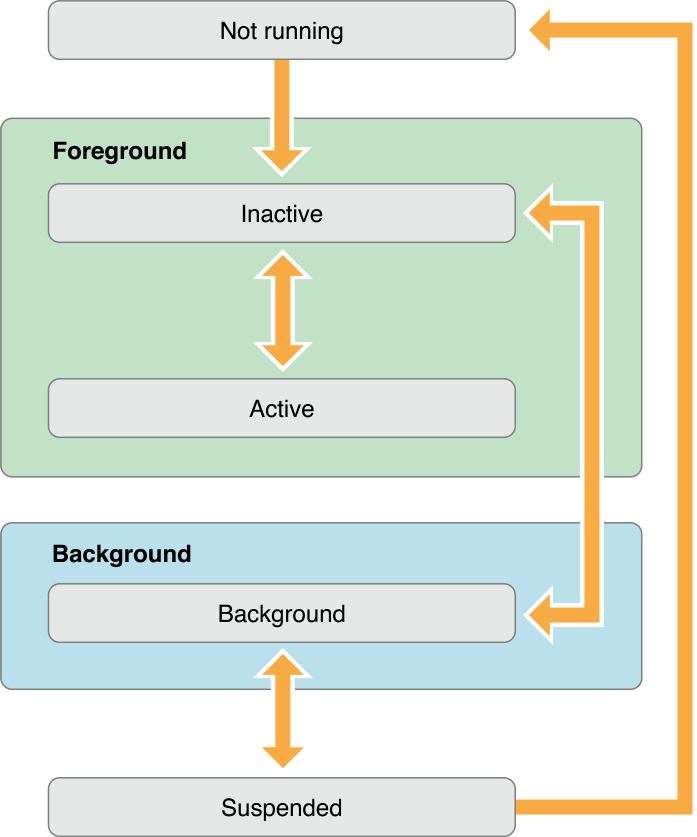
iOS Application生命周期

AppDelegate

  1. - (BOOL)application:(UIApplication *)applicationwillFinishLaunchingWithOptions:(NSDictionary *)launchOptions
    将要启动
  2. - (BOOL)application:(UIApplication *)applicationdidFinishLaunchingWithOptions:(NSDictionary *)launchOptions
    程序首次完成启动时执行,若直接启动,launchOptions没有数据,若由其他应用启动,launchOptions包含数据
  3. - (void)applicationWillResignActive:(UIApplication *)application
    应用进入后台,程序失去激活(Active)时调用
    需要在此方法中执行下列任务
    • 暂停正在执行的任务
    • 禁止计时器
    • 减少OpenGL ES帧率
    • 若为游戏应暂停游戏
  4. - (void)applicationDidEnterBackground:(UIApplication *)application
    已经进入后台时调用
    • 释放共享资源
    • 保存用户数据
    • 作废计时器
    • 保存足够的程序状态以便一次恢复
  5. - (void)applicationWillEnterForeground:(UIApplication *)application
    从后台进入前台时调用
  6. - (void)applicationDidBecomeActive:(UIApplication *)application
    应用进入激活状态
  7. - (void)applicationWillTerminate:(UIApplication *)application
    应用兼将要退出时调用

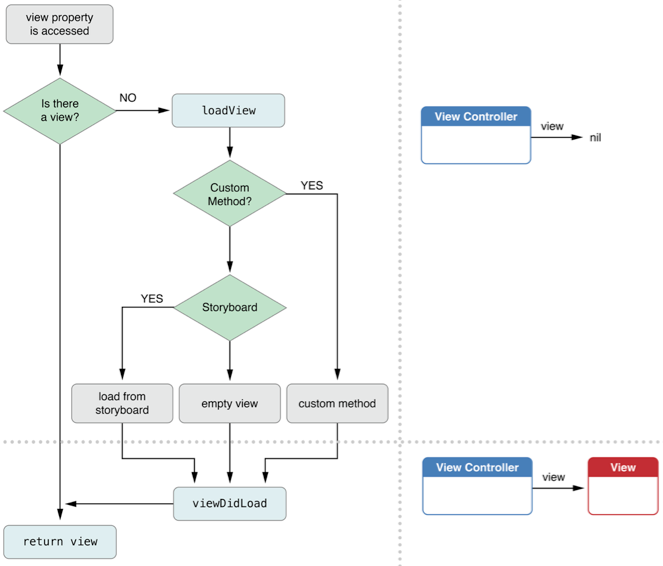
UIController

  • alloc 创建对象
  • init 初始化对象
  • loadView 从nib载入视图
  • viewDidLoad 载入完成
  • viewWillApper 视图出现在屏幕之前
  • viewWillDisapper 渲染完成,显示在屏幕上
  • viewDiddisapper 从屏幕移除之前
  • viewWillUnload 已经从屏幕移除
  • viewDidUnload 载出之前
  • dealloc 被销毁

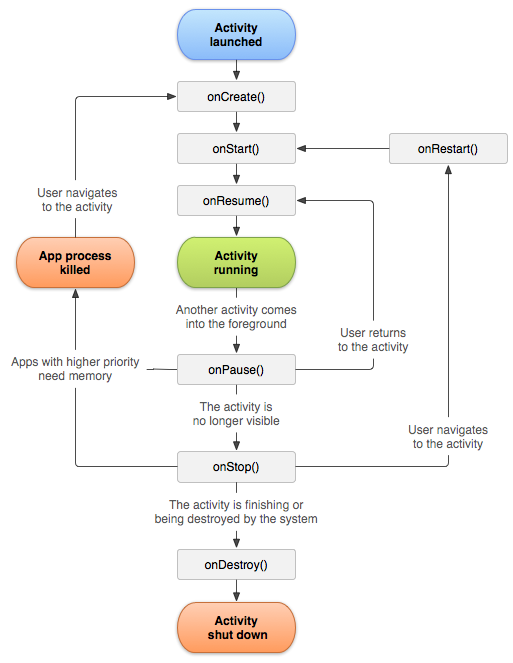
Android Activity生命周期

  1. onCreate()
    创建Activity
  2. onStart()
    创建或从后台重新到前台时被调用
  3. onRestart()
    从后台到前台时被调用
  4. onResume()
    创建或者被覆盖、后台重新回到前台时被调用
  5. onPause()
    被覆盖或者锁屏时被调用
  6. onStop()
    退出当前Activity或者跳转到新的Activity时被调用
  7. onDestroy()
    退出Activity时被调用,调用之后Activity就被销毁了
  8. onSaveInstanceState(Budle outState)
    Activity被系统销毁时调用
  9. onRestoreInstanceState(Budle savedInstanceState)
    Activity重建时被调用

对比

第一次启动

iOS:

1
2
3
4
5
- [AppDelegate application:didFinishLaunchingWithOptions:]
- [ViewController viewDidLoad]
- [ViewController viewWillAppear:]
- [AppDelegate applicationDidBecomeActivie:]
- [ViewController viewDidAppear:]

Android:

1
2
3
onCreate()
onStart()
onResume()

应用进入后台

iOS

1
2
- [AppDelegate applicationWillResignActive:]
- [AppDelegate applicationDidEnterBackground:]

Android

1
2
onPause()
onStop()

应用从后台进入前台

iOS

1
2
- [AppDelegate applicationWillEnterForeground:]
- [AppDelegate applicationDidBecomeActive:]

Android

1
2
onStart()
onResume()

完全退出应用

iOS

1
2
3
4
- [AppDelegate applicationDidEnterBackground:]
- [ViewController viewWillDisappear:]
- [ViewController viewDidDisappear:]
- [AppDelegate applicationWillTerminate:]

Android

1
2
3
onPause()
onStop()
onDestroy()

分析

Android、iOS的生命周期看着大同小异,但是差别还算比较大。
Android的Activity类似iOS中UIApplication + UIViewController。
iOS的应用像是一个全屏展开的窗口,UIApplication负责管理运行状态的生命周期,UIController负责管理视图,视图间靠通知传递数据
Android的App可以理解为ActivityServiceCentent ProviderBroadcastReceiver组成,可视部分主要由Activity组成,Activity要管理运行状态和视图,而且每个Activity的运行状态相对独立,四大组件之间、包括应用之间都可以通过Intent传递数据。


https://github.com/SeniorZhai/BlurAndroid

1
2
3
4
5
6
7
8
9
10
11
12
13
14
15
16
17
18
19
20
21
22
23
24
25
26
27
28
29
30
31
32
33
34
35
36
37
38
39
40
41
42
43
44
45
46
47
48
49
50
51
52
53
54
55
56
57
58
59
60
61
62
63
64
65
66
67
68
69
70
71
72
73
74
75
76
77
78
79
80
81
82
83
84
85
86
87
88
89
90
91
92
93
94
95
96
97
98
99
100
101
102
103
104
105
106
107
108
109
110
111
112
113
114
115
116
117
118
119
120
121
122
123
124
125
126
127
128
129
130
131
132
133
134
135
136
137
138
139
140
141
142
143
144
145
146
147
148
149
150
151
152
153
154
155
156
157
158
159
160
161
162
163
164
165
public class Blur{
private static final String TAG = "Blur";

public static Bitmap fastblur(Context context,Bitmap sentBitmap,int radius) {
if (VERSION.SDK_INT > 16) {
Bitmap bitmap = sentBitmap.copy(sentBitmap.getConfig(),true);
final RenderScript rs = RenderScript.create(context);
final Allocation input = Allocation.createFromBitmap(rs,sentBitmap,Allocation.MipmapControl.MIPMAP_NONE,Allocation.USAGE_SCRIPT);
final Allocation output = Allocation.createTyped(rs,input.getType());
final ScriptIntrinsicBlur script = ScriptIntrinsicBlur.create(rs,Element.U8_4(rs));
script.setRadius(radius);
script.setInput(input);
script.forEach(output);
output.copyTo(Bitmap);
return bitmap;
}

Bitmap bitmap = sentBitmap.copy(sentBitmap.getConfig(),true);
if (radius < 1) {
return (null);
}

int w = bitmap.getWith();
int h = bitmap.getHight();

int[] pix = new int[w * h];
bitmap.getPixels(pix,0,w,0,0,w,h);

int wm = w - 1;
int hm = h - 1;
int wh = w * h;
int div = radius + radius + 1;

int r[] = new int[wh];
int g[] = new int[wh];
int b[] = new int[wh];
int rsum,gsum,bsum,x,y,i,p,yp,yi,yw;
int vmin[] = new int[Math.max(w,h)];

int dv[] = new int[256 * divsum];
for (i = 0;i < 256 * divsum;i++) {
dv[i] = (i / divsum);
}

yw = yi = 0;

int[][] stack = new int[div][3];
int stackpointer;
int stackstart;
int[] sir;
int rbs;
int r1 = radius + 1;
int routsum,goutsum,boutsum;
int rinsum,ginsum,binsum;

for (y = 0;y < h;y ++) {
rinsum = ginsum = binsum = routsum = goutsum = boutsum = rsum = gsum = bsum = 0;
for (i = -radius;i < radius; i++) {
p = pix[yi + Math.min(wm,Math.max(i,0))];
sir = stack[i + radius];
sir[0] = (p & 0xff0000) >> 16;
sir[1] = (p & 0x00ff00) >> 8;
sir[2] = (p & 0x0000ff);
rbs = r1 - Math.abs(i);
rsum += sir[0] * rbs;
gsum += sir[1] * rbs;
bsum += sir[2] * rbs;
if (i > 0) {
rinsum += sir[0];
ginsum += sir[1];
binsum += sir[2];
} else {
routsum += sir[0];
goutsum += sir[1];
boutsum += sir[2];
}
}
stackpointer = radius;

for (x = 0; x < w; x++) {
rinsum = ginsum = binsum = routsum = goutsum = boutsum = rsum = gsum = bsum = 0;
yp = -radius * w;
for (i = -radius; i <= radius; i++) {
yi = Math.max(0, yp) + x;

sir = stack[i + radius];

sir[0] = r[yi];
sir[1] = g[yi];
sir[2] = b[yi];

rbs = r1 - Math.abs(i);

rsum += r[yi] * rbs;
gsum += g[yi] * rbs;
bsum += b[yi] * rbs;

if (i > 0) {
rinsum += sir[0];
ginsum += sir[1];
binsum += sir[2];
} else {
routsum += sir[0];
goutsum += sir[1];
boutsum += sir[2];
}

if (i < hm) {
yp += w;
}
}
yi = x;
stackpointer = radius;
for (y = 0; y < h; y++) {
// Preserve alpha channel: ( 0xff000000 & pix[yi] )
pix[yi] = (0xff000000 & pix[yi]) | (dv[rsum] << 16) | (dv[gsum] << 8) | dv[bsum];

rsum -= routsum;
gsum -= goutsum;
bsum -= boutsum;

stackstart = stackpointer - radius + div;
sir = stack[stackstart % div];

routsum -= sir[0];
goutsum -= sir[1];
boutsum -= sir[2];

if (x == 0) {
vmin[y] = Math.min(y + r1, hm) * w;
}
p = x + vmin[y];

sir[0] = r[p];
sir[1] = g[p];
sir[2] = b[p];

rinsum += sir[0];
ginsum += sir[1];
binsum += sir[2];

rsum += rinsum;
gsum += ginsum;
bsum += binsum;

stackpointer = (stackpointer + 1) % div;
sir = stack[stackpointer];

routsum += sir[0];
goutsum += sir[1];
boutsum += sir[2];

rinsum -= sir[0];
ginsum -= sir[1];
binsum -= sir[2];

yi += w;
}
}

Log.e("pix", w + " " + h + " " + pix.length);
bitmap.setPixels(pix, 0, w, 0, 0, w, h);
return (bitmap);
}
}